RV and Adventure Vehicles
How Can RV Sales Teams Build Customer Proposals Without Relying on Engineering?
How sales teams can use predefined floor plans, product options, and configuration rules to prepare visual RV proposals and connect customer and sales workflows.
By CELA Technology ·
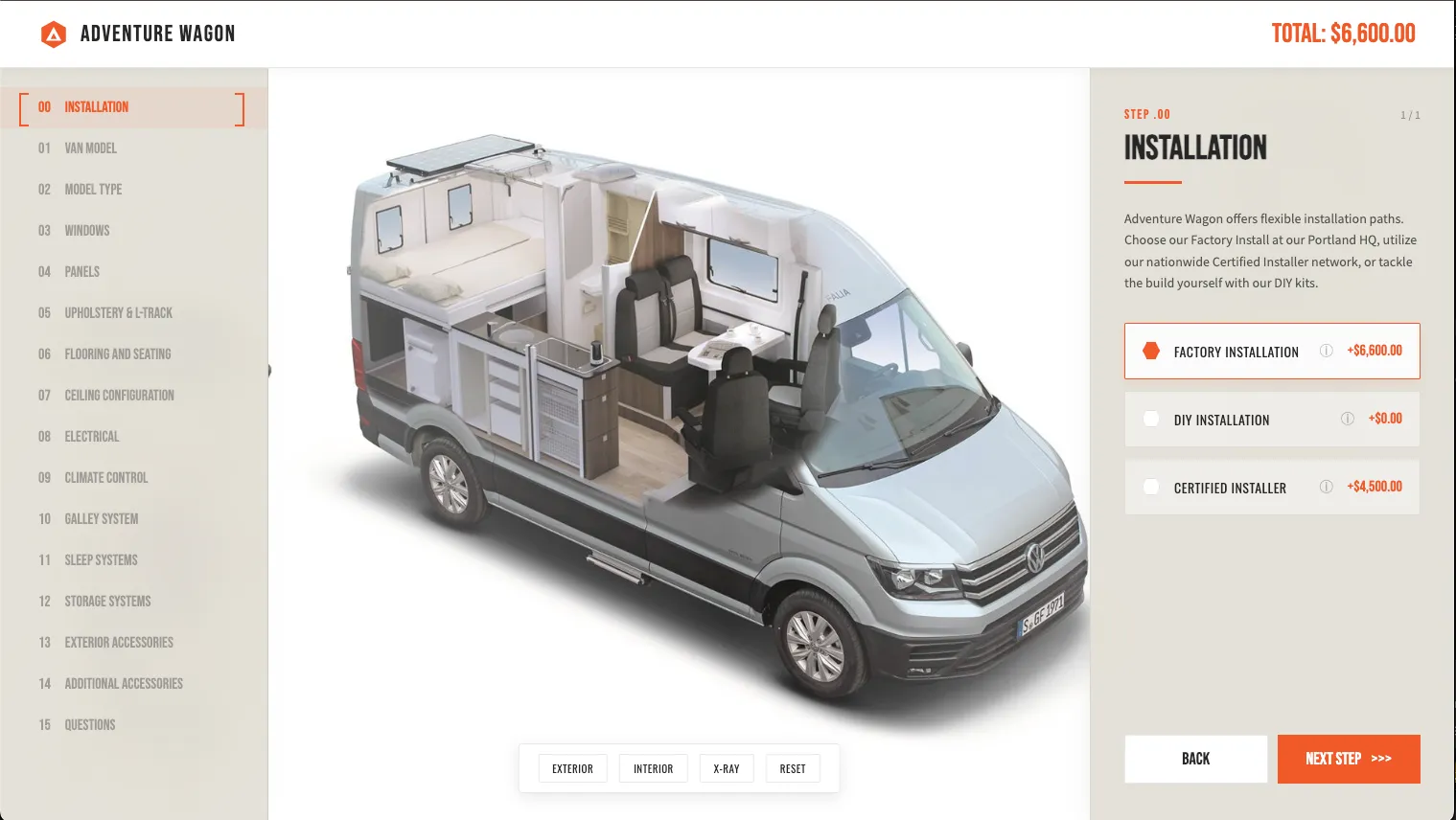
RV sales teams can use a 3D configurator to turn customer requirements into visual proposals using predefined floor plans, product options, and configuration rules. Instead of preparing each proposal through separate drawings and documents, Sales can build multiple configurations, present alternatives, and share interactive proposals with customers.
For RV manufacturers with established product options and configuration rules, this creates an opportunity to make proposal preparation more intuitive while involving Engineering when additional technical validation is needed.
How Are RV Sales Proposals Typically Prepared?
For manufacturers of camper vans, motorhomes, and other configurable RVs, the sales process often begins with understanding how a customer intends to use the vehicle.
Sales teams collect requirements such as sleeping capacity, seating arrangements, storage, kitchen equipment, electrical systems, accessories, and budget. They then identify suitable models, floor plans, and available options.
Depending on the manufacturer's product structure and internal tools, preparing a proposal may involve several steps:
- Collect customer requirements: Understand the customer's intended use, priorities, and budget.
- Select a suitable vehicle and layout: Identify available models, floor plans, and equipment options.
- Prepare a visual proposal: Use existing floor plan drawings, product documentation, sketches, or preliminary layouts to illustrate the proposed configuration.
- Confirm configuration details: Consult product specialists or Engineering when a requested combination requires additional technical input.
- Present and refine the proposal: Review the proposed layout with the customer, make adjustments, and prepare pricing or a formal quote.
This workflow allows sales teams to combine customer requirements with product expertise.
As the number of configurable options grows, however, there are opportunities to make the process more visual, flexible, and connected.
Where Can RV Sales Proposal Workflows Be More Efficient?
Preparing visual floor plans and proposals
A customer may request a particular sleeping arrangement, additional storage, or a different seating configuration.
If the manufacturer already offers suitable layouts and approved options, the salesperson may have the information needed to recommend a solution. The challenge is presenting that solution clearly.
Preparing a new sketch, modifying an existing floor plan, or assembling several documents can add steps to the proposal process.
A more interactive approach would allow Sales to work directly with available layouts and components, creating a visual proposal as the configuration is selected.
Presenting multiple configuration options
Customers often benefit from comparing several suitable solutions rather than reviewing only one proposal.
For example, a camper van buyer might want sleeping capacity for four, additional storage, and a comfortable daytime workspace.
Different floor plans may prioritize those requirements differently.
Sales could prepare three alternatives:
- Proposal A: Prioritizes sleeping capacity.
- Proposal B: Offers additional storage.
- Proposal C: Emphasizes daytime living and workspace.
Presenting these configurations side by side gives customers a clearer understanding of the trade-offs between available layouts.
Keeping proposals and customer conversations connected
A proposal may involve floor plan drawings, equipment lists, pricing documents, emails, and customer feedback.
As the customer considers different options, keeping these materials aligned becomes increasingly important.
A saved, interactive configuration can provide a common reference point for both Sales and the customer, helping each conversation continue from the latest proposed vehicle configuration.
How Can a 3D RV Configurator Help Sales Teams Build Proposals?
A 3D RV configurator combines interactive product visualization with predefined configuration options and product rules.
For Sales, this means a configurator can become more than a product demonstration tool. It can also provide an intuitive environment for building customer proposals.
Configure floor plans visually
Sales teams can select an available vehicle model, explore supported floor plans, and configure equipment and accessories within the product.
Instead of relying only on a top-down drawing, an interactive 3D view can help illustrate how different components fit into the overall vehicle.
For camper vans, this may include beds, seating, cabinetry, storage, kitchen modules, electrical equipment, and other configurable components.
Where supported, animations can also demonstrate how moving components operate, such as a folding bed, sliding storage system, or expandable kitchen.
This helps Sales explain not only what is included in a proposal, but how the proposed configuration works.
Apply existing product configuration rules
RV manufacturers often have established rules governing which components, layouts, and options can be combined.
For example, a particular seating arrangement may only be available with certain floor plans. An accessory may require another component, or a specific equipment package may be incompatible with a selected layout.
These relationships can be represented through configuration logic.
A rule-based configurator can guide Sales through known, approved combinations while identifying selections that fall outside predefined options.
This makes existing product knowledge easier to apply consistently across customer proposals.
Create and compare multiple proposals
A salesperson can use the configurator to prepare different configurations around the same customer requirements.
Each proposal can represent a different balance of space, functionality, equipment, and budget.
Rather than asking the customer to interpret several separate drawings, Sales can present the alternatives through interactive 3D views.
The customer can then evaluate the differences and identify which configuration best matches their priorities.
Save and share interactive configurations
When a configurator supports saved and shareable configurations, Sales can send customers direct links to the proposed builds.
Customers can revisit each proposal, explore the vehicle, review selected options, and compare alternatives after the sales conversation.
If customer editing is enabled, they may also be able to adjust permitted options and continue refining their preferences.
The proposal becomes something the customer can interact with, rather than a document they can only read.
Who Can Use an RV Configurator: Sales Teams or Customers?
A 3D RV configurator can support two complementary workflows: internal sales configuration and external customer self-configuration.
Internal use: Sales-assisted configuration
In an internal workflow, the salesperson begins with a customer conversation.
They interpret the customer's requirements, select suitable floor plans and equipment, and build one or more proposed configurations.
The configurator helps Sales visualize alternatives, explain product features, and prepare proposals based on the manufacturer's available options and configuration rules.
Depending on the system, internal users may also have access to additional information, such as dealer pricing, proposal tools, or configuration approval status.
External use: Customer self-configuration
In an external workflow, the customer starts directly from the manufacturer's website.
They explore available RV models, compare floor plans, select materials and accessories, and build a configuration around their preferences.
They may then save their configuration, request a quote, or share it with a salesperson.
One product logic, two connected experiences
Both workflows can use the same underlying product definitions and configuration rules, even when their interfaces, permissions, and available features differ.
The difference is often who starts the configuration.
Some customers begin online and bring their selected options to Sales. Others begin with a salesperson, receive several recommended configurations, and continue exploring them independently.
A connected configuration experience allows these two approaches to complement each other throughout the buying process.
What Does a Configurator-Assisted RV Sales Workflow Look Like?
Consider an RV manufacturer offering multiple vehicle models, approved floor plans, and configurable equipment packages.
A configurator-assisted sales process could follow six stages.
- Understand customer requirements
Sales discusses how the customer plans to use the RV, including sleeping arrangements, storage needs, travel conditions, equipment preferences, and budget.
- Build suitable configurations
Using the manufacturer's available layouts and product rules, Sales prepares two or three configurations that address the customer's priorities.
- Present and compare proposals
Sales walks the customer through the configurations in 3D, explaining the differences in floor plans, equipment, functionality, and available options.
- Share configurations for further exploration
The customer receives links to the proposed builds and can revisit the alternatives after the meeting.
- Refine and validate the selected configuration
Sales updates the preferred configuration based on customer feedback. Requests outside predefined product rules can be directed to Engineering or the appropriate technical team for review.
- Prepare the quote and proceed toward the order
Once the configuration is confirmed, its selected options can provide structured information for the quoting process.
Where pricing, CPQ, CRM, or dealer systems are integrated, the configuration may also support a more connected transition from proposal to quote and order.
The key change is that Sales and the customer can work from the same visual product configuration throughout the discussion.
How Can RV Manufacturers Benefit From Sales-Facing Configurators?
For sales teams: More intuitive proposal preparation
Sales teams can translate customer requirements into visual configurations using established product options and rules.
They can prepare alternative proposals, demonstrate functional differences, and guide customers through available choices without recreating every proposal from separate drawings.
For customers: Clearer comparisons and more informed choices
Customers can see how a proposed RV is configured, explore its features, and compare different layouts.
Interactive proposals also allow customers to revisit their options after a meeting, giving them more opportunities to understand the product before making a decision.
For manufacturers: Better use of existing product knowledge
Manufacturers already maintain valuable information about floor plans, component compatibility, available equipment, and production-approved configurations.
A rule-based configurator can make that knowledge accessible to both Sales and customers through a consistent interface.
Standard configurations can be prepared using predefined rules, while requests requiring new technical decisions can follow the manufacturer's engineering review process.
Over time, a sales-facing configurator can also become part of a broader digital sales workflow, connecting product selection with dealer operations, pricing, CPQ, CRM, and order preparation where appropriate integrations are available.
Frequently Asked Questions
Can RV sales teams create customer proposals using a 3D configurator?
Yes. A 3D RV configurator can allow sales teams to select available floor plans, configure approved options, and prepare visual proposals based on customer requirements. Features such as saved configurations and proposal sharing depend on the specific system.
Can an RV configurator support multiple floor plans and customer proposals?
Yes, provided the manufacturer's available layouts and options are represented in the configurator. Sales teams can prepare alternative configurations to help customers compare sleeping arrangements, storage, seating, equipment, and other product features.
When does an RV configuration require engineering review?
Engineering review may be needed when a customer requests a custom layout, structural modification, unvalidated component combination, or another change outside the manufacturer's predefined configuration rules. Standard, approved configurations can be handled through the configurator according to the manufacturer's workflow.
Making RV Sales Configuration More Intuitive
A 3D configurator can do more than help customers build their ideal RV. It can also help sales teams turn customer requirements into clear, visual, and comparable proposals.
By combining product visualization with configuration logic, manufacturers can support both customer self-service and sales-assisted configuration.
The result is a more connected sales experience — where Sales can configure what they recommend, customers can explore what they prefer, and both can move forward from the same product configuration.